

Pampanga State University – Main Campus
Find, rent and manage campus stalls in one place.
iMapSU is the Office of Auxiliary Services' map-driven system for campus stalls. Explore the campus in 3D, apply for a vacant space and manage your tenancy online.
Already a tenant? Sign In
Explore the campus
Find stalls and open spaces on a 3D map, and rate the stalls you visit. No account needed.
Apply for a stall
Send your rental application and requirements online, any time.
Manage with ease
Your lease, monthly bills, receipts and requests in one place.
From the Office of Auxiliary Services
Latest announcements
- Nov 2, 2026
Four campus stalls are open for rental applications
UFC Stall 2, CAS Stall 1, IT & Engineering Lab Stall 1 and Auditorium Stall 1 are vacant. Create an Aspiring Tenant account to apply. You will need a letter of intent, DTI and BIR documents, and a business permit.
- Nov 2, 2026
Rate the campus stalls you visit
Your feedback helps us keep campus stalls clean, fair and well run. Open Student feedback, choose a stall, and give a star rating with a short comment about its products or service.
From application to your first month
Applying for a stall
- 1
Create your account
Sign up as an aspiring tenant and verify your email.
- 2
Choose a vacant stall
Find an open space on the map or in the list of rentable spaces.
- 3
Send your requirements
Upload your letter of intent, SEC/DTI, BIR and permits, and accept the stall rules.
- 4
Visit the office
The OAS reviews your application and schedules your office visit.
Already renting a stall?
- View each month’s bill with the electricity and water breakdown
- Upload your official receipt and track its verification
- Report maintenance concerns and follow their progress
- Read announcements from the Office of Auxiliary Services
See which stalls are free before you apply
Every building on campus is on the map. Green pins are vacant spaces you can apply for; red ones are taken. Select a building to see its stalls, rent and ratings.
iMapSU (Interactive Map-Driven Stall Management System) is run by the Office of Auxiliary Services of Pampanga State University.
Open the campus map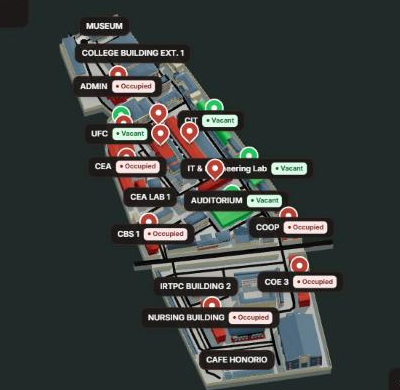
For students and visitors
Rate the stalls you visit
Bought a meal, had something printed or used a service on campus? Tell the stall how it went. Your rating is anonymous and you do not need an account.
Each stall's average rating and latest comments appear on the campus map, and help tenants and the Office of Auxiliary Services improve campus services. You can rate a stall once while it has the same tenant.
- 1
Open the campus map
It is open to everyone. You do not need an account.
- 2
Choose the stall you visited
Select its building on the map, then pick the stall from the list.
- 3
Send your rating
Press “Rate this stall”, give it 1 to 5 stars and add a comment if you like.
Ready to open a stall on campus?
Create your account and send your application. The OAS will review it and schedule your office visit.